
The only remote tool you'll ever need.
SSH, Serial, VNC, RDP, file managers and an Integrated Code Editor, all in one app, with a built-in AI agent that fixes errors for you. Start a session on your desktop, pick it up on your phone.
- 4.5★
- 264 store ratings
- 14
- Protocols, one app
- 1
- Account, 7 platforms
- Zero Knowledge
- Credentials we can't read
Don't take our word for it
Ask your AI why to switch to Tempest
One click opens the same question in ChatGPT or Claude. For Gemini the prompt is copied before the app opens, so you paste it in and see what it says about Tempest versus what you're using now.
One window, everything
See it in action
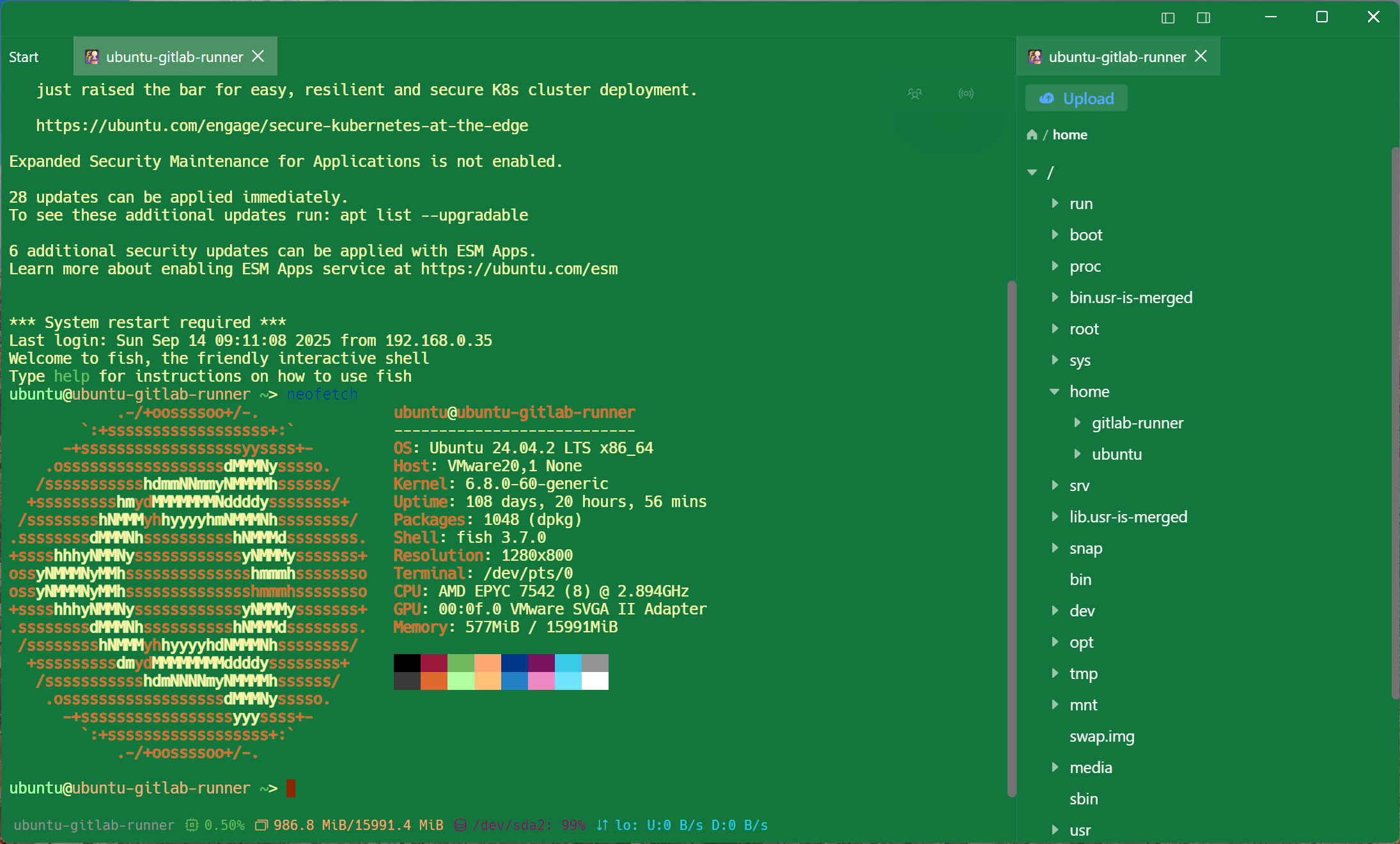
Every feature below lives in the same window — no switching apps, no losing your place.
-
1
Synced host vault
Every server, credential and tag, end-to-end encrypted and available on every device you sign into.
-
2
Global command palette
Jump to any host or run any command from one keystroke, anywhere in the app.
-
3
Native GPU terminal
A real VT-compliant terminal built in Rust — fast enough to drive full-screen TUIs like vim and htop.
-
4
Storm AI, built in
An AI agent that reads your session, runs commands, and explains what it did — right beside the terminal.
AI-powered
Describe it in English. It gets done.
Tempest's built-in AI agent reads the error, plans the fix, runs the commands, and explains what changed. One conversation, inside your terminal.
Need more than a quick fix? Connect external coding agents over ACP and hand them the long-running, complex tasks. They keep working in your session while you watch and steer from any device.
Real infrastructure work, done for you, up to 90% faster
Not just autocomplete. Hand it the whole job. It plans, runs the commands across your real session, checks its own work, and reports back.
> I can't connect to 10.x.x.x. Help me troubleshoot.
- Checks reachability: ping, traceroute, and the target port
- Inspects local routing, firewall rules, and security groups
- Tests the service itself once the network path is confirmed
- Pinpoints exactly where the path breaks and proposes the fix
> My apt install has package conflicts. Help me fix it.
- Reads the exact conflict error and dependency chain
- Checks installed/held versions and any third-party PPAs
- Resolves the conflict by holding, downgrading, or purging as needed
- Reinstalls cleanly and verifies the package works
> This tar file is our software update. Help me install it.
- Extracts and inspects the archive contents first
- Backs up the current version before touching anything
- Stops the service, installs, and restores config/permissions
- Restarts and verifies the new version is healthy
> There's an STP loop somewhere on the network. Check all 12 switches and find it.
- Opens a session on every switch in parallel, not one at a time
- Reads spanning-tree state across all of them side by side
- Cross-references blocking/forwarding ports to trace the loop's physical path
- Pinpoints the offending switch and port, and proposes the fix
> Migrate this server's MySQL database to Postgres.
- Dumps the live MySQL schema and data with mysqldump
- Converts types, indexes and constraints to Postgres equivalents
- Provisions Postgres and loads the converted data
- Runs row-count and checksum diffs to verify the migration
> Upgrade Kubernetes on this cluster. Make sure backups exist and everything stays compatible.
- Snapshots etcd and every PersistentVolume first
- Scans manifests and Helm charts for deprecated APIs
- Upgrades the control plane, then node pools, one at a time
- Re-runs health checks and keeps a rollback plan ready
Everything, one app
A better SSH & SFTP client, and everything your infra team asks for
A native Rust core that gets out of your way, plus every zero-trust gateway, legacy quirk, and enterprise checkbox that shows up on a real IT checklist.
Self-hosted
Run it in Docker or Kubernetes; hosts, vaults and history never leave your network. Enterprise adds vault isolation, audit trails and the admin console.
Open source code review
Every line of the server is public. Audit what touches your credentials before you run it.
120Hz native performance
GPU-accelerated rendering, Metal on iOS and Vulkan on Android, sustains 120Hz under heavy load.
14 protocols, one app
SSH, RDP, VNC, SFTP, FTP, S3, WebDAV, Telnet, RCON, Kubernetes, Serial, Local Shell, MSYS, Zmodem.
Keyboard-first
Every action has a shortcut. Manage connections, files and tabs without reaching for the mouse.
Keyboard presets
Build your own key rows and save them as presets. Load the layout you want on any device.
Global command palette
Pop it open from anywhere and launch a new session in a single keystroke.
Floating windows
Pull any session out of the grid into its own movable window. Park a pod shell over a live Windows desktop and keep watching it while you work elsewhere.
Bulk edit hosts
Multi-select across your whole host list and edit tags, folders, or settings on hundreds of hosts at once.
Zero-knowledge E2E
Encryption happens only on your device, on every protocol. Credentials never leave your control.
Cross-platform sync
Every host, credential and setting synced end-to-end encrypted across Windows, macOS, Linux, iOS and Android.
Continuous sessions
Start on desktop, live read & write mirror to your phone over its own end-to-end encrypted protocol.
Zero-trust gateways
Native presets for Teleport, Cloudflare Access, Tailscale SSH, AWS SSM and GCP IAP.
HashiCorp Vault
Authenticate SSH with credentials fetched live from your own Vault. KV secrets or signed certs, nothing stored locally.
Multi-tenant vaults
Every team's vault is isolated at the storage layer, not just by access control.
Access policy binding
Fine-grained policies bound to hosts and vaults, per user or group, enforced server-side.
AI firewall
Four admin-defined command tiers (auto-run, needs approval, expensive, forbidden) pushed to every device, plus switches for Bypass mode and external agents.
SSH agent forwarding
Forward your Tempest-managed keys or a system / 1Password agent. Keys never leave your device.
YubiKey / FIDO2
Hardware-backed SSH keys. Private keys never touch disk, ever.
SFTP sidebar
Browse, edit and transfer files from a side panel without ever leaving your terminal tab.
Integrated Code Editor
Open remote files with syntax highlighting and save changes directly back over SFTP. No download-edit-reupload loop.
Scratch Pad & Snippets
Markdown notes and saved commands, synced everywhere.
Scheduled runs
Auto-run a snippet on a schedule for unattended inspections. AI summarizes the output into a report for you.
Smart push notifications
When a job finishes or fails, or a host is sitting there waiting on a sudo password, the agent pushes it to every device you're signed in on. Tempest Push, Telegram, Discord, Bark, email or your own webhook.
Auto-reconnect
Sessions recover automatically after Wi-Fi drops, sleep, or a flaky VPN. No manual redial.
Performance monitor
Live per-core CPU, memory, disk and network for every host, right in the sidebar.
Windows RDP & VNC
Full remote desktops, not just terminals. Windows, macOS screen sharing, and Linux VNC.
Legacy device support
Configurable backspace behavior and encoding fallbacks for decades-old switches and serial consoles.
HTTP & SOCKS5 proxy
Route SSH or RDP through a proxy or a custom ProxyCommand. Corporate networks welcome.
Jump host chaining
Recursive bastion hops, GUI-driven, like ProxyJump without the flag soup.
Mosh support
UDP-based sessions that survive network changes and laptop sleep without losing your session.
Connection multiplexing
Reuse one master SSH connection per host. Every new tab opens instantly, no re-handshake.
X11 forwarding
Run a remote GUI app and have its window appear on your local desktop. No VNC setup needed.
Built-in iPerf3
Run bandwidth benchmarks straight from Tempest. No separate tool to install.
Session recording
Record any session and export it as an asciicast. Replay it for debugging or an audit trail.
Regex highlighting
Colour OK, FAIL and warnings in terminal output, or write your own regex rules to highlight anything you watch for.
Additional password
Save a second password (like sudo) and have Tempest send it into the session automatically.
Kubernetes workflow
Browse namespaces and pods, watch status and restarts, then open a shell in any of them. kubectl, Helm, k9s and stern auto-pick the right context.
TUI automation
A real VT terminal lets the AI drive full-screen TUIs: BIOS/UEFI over serial, vim, htop.
MCP server
Plug Tempest into Claude or any MCP client and let the agent operate remote hosts itself.
Visual Studio Code Integration
Open saved SSH servers and remote folders in VS Code with Tempest Remote. Reuse credentials, proxies and jump hosts through Tempest CLI and Remote - SSH.
REPL SSH Bastion
Use Tempest CLI as a Linux SSH login shell. Connect to saved servers from an interactive prompt, with separate accounts and vaults for each Unix user.
Tempest CLI
Pick and filter saved servers from your terminal, then connect over SSH, Telnet or RCON. Browse local files, SFTP, S3, WebDAV and FTP in a keyboard-driven file manager.
Sunshine/Moonlight
Stream a Sunshine desktop into a Tempest tab over Moonlight, with low-latency H.264/HEVC video and keyboard/mouse input. Available through the optional desktop component (Pro).
PAM Ops
Connect through PAM and zero-trust gateways including Cloudflare Access, HashiCorp Boundary and Teleport. Use ProxyCommand, SSH certificates and gateway CLIs with your existing access policies.
Git changes
Inspect staged, unstaged and untracked files in local or SSH repositories and open file diffs. Pro also includes submodule changes.
Version history & restore
Review previous versions of saved hosts, compare changes and restore an earlier version.
Tempest Drive
Create and edit documents in Tempest Drive, and use AI to help write them. Keep instructions and operational notes alongside your connections.
Multi-instance runs
Run one Drive document across multiple SSH sessions and review the results in one dashboard.
Drive run history
View and manage past Drive runs so you can revisit the results of earlier tasks.
Files in AI conversations
Attach documents, PDFs and images to a conversation for Tempest to read and pass to your AI model.
Drive access for AI
Let the AI list and read your Tempest Drive documents and their attachments while working on a task.
AI web search
Let the AI search the web while it works to find information beyond the current session.
SFTP bookmarks
Save and sync remote path bookmarks, then jump straight to the folders you use across your devices.
Multiple accounts
Sign in to your company server and your personal account, and switch between them in the app.
SSH port forwarding
Create and use SSH tunnels to access services through your SSH connections.
Startup command
Run a saved command automatically after connecting to a host.
Custom SSH algorithms
Choose which SSH algorithms are enabled to match the requirements of your servers.
Host latency test
Measure the round trip to a saved host from its context menu and see the result directly in the host list.
Missing something? Ask for it in the community
Multitasking
One session is never the limit
The protocols above aren't modes you switch between. Pull a live Windows desktop and a Kubernetes pod browser out into floating windows, drop into a pod's shell underneath, and keep all three connected at once.
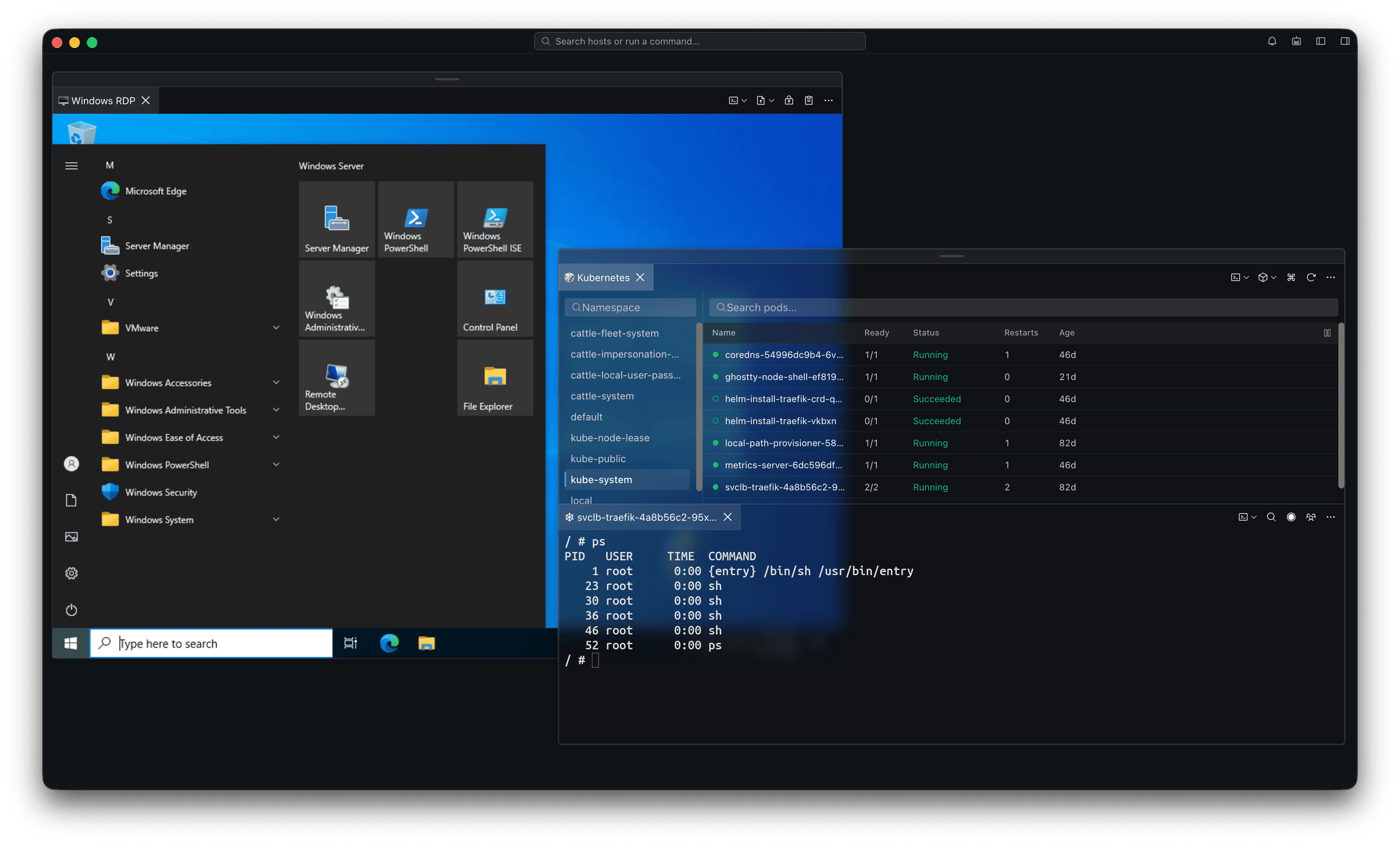
- Float anything, anywhere
- Pop a session out into a floating window and put it where you need it — over a remote desktop, beside a terminal, or off to one side.
- Every protocol, side by side
- RDP, SSH, SFTP, Kubernetes, serial and local shells are all just sessions here. Mix as many as the job needs in one window.
- Nothing loses its place
- Move, resize or stack them however you like. Every session stays connected and keeps its scrollback while you work in another.
Security & self-hosting
You hold the keys. Or the whole server.
A remote-access tool asks you for the most sensitive thing you own. Here is everything we can see — and how to leave us out of it entirely.
- Sessions start on your machine
- SSH, SFTP, VNC and RDP connect straight to your host. Never proxied through us.
- Encrypted before it syncs
- Passwords and keys are encrypted on your device with a key we never receive. We hold ciphertext.
- Or store nothing at all
- Point Tempest at your own HashiCorp Vault and it fetches a secret per connection.
- Hardware-backed
- Passkeys and TOTP on the account. YubiKey and post-quantum on the connection.
- Or skip our cloud
- The server is open source. Run it yourself and nothing leaves your network.
Run the server yourself
The Tempest server is open source. One docker-compose.yml brings up the whole backend on your own box. Enterprise adds vault isolation and a full audit trail on the same stack.
Teams
Collaborate with your team
Remote support without driving to the data center. Join a live session from wherever you are.
-
No more "can you come over here?"
-
Share a live SSH, Local terminal, Serial, or Kubernetes session with a link. Whoever's helping joins from wherever they are. No walking over, no screen-share app.
-
Join from a phone, not just a laptop
-
Teammates can join a shared session straight from iOS or Android, with full read and write, same as on desktop.
-
Handoff: pick up your own session, too
-
Not just for teammates. Continue your own desktop session on your phone, live read & write, mid-command.
-
Fine-grained permission control
-
Bind access policies to hosts and vaults per user or group. Helpers only see what they're granted, nothing more.
Testimonials
Loved by developers worldwide
"Beside its functions what is most impressive is the pace of improvements and the speed of fixes in response to minor bug reports. Not to forget you get a lifetime license at a very fair price compared to other SSH Clients subscription models. Works across multiple devices like a charm."
Works perfectly
"All the OS I use are supported (iOS, macOS, Android, Windows). Finally one app for all with Cloud Sync."
"Great app, no ads, SSH quality is good. Able to easily connect to my home Arch main PC and my Ubuntu server. Would recommend."
"Simple and objective, as things should be."
"Functional — reminds me of Mobaxterm but mobile. Good app."
"Nice app, great UX for a terminal client."
Absolutely Epic
"🤯"
"Intuitive because it is simple and objective. Solves the problem."