
Lens alternative
Not an IDE for Kubernetes. The half you use every day.
Lens is a full cluster IDE, and that is both its appeal and its weight. If what you actually open it for is finding a pod, reading its logs, getting a shell, and then SSHing to the node it landed on, Tempest does that from the same window as the rest of your infrastructure.
macOS, Windows, Linux, Android & iOS. Kubernetes is a Pro feature.
Tempest vs Lens
Being straight about scope: these are not the same category of tool.
| Tempest | Lens | |
|---|---|---|
| Pods: list, logs, exec | Yes | Yes |
| Nodes: list and shell | Yes, privileged node shell | Yes |
| Resource browser, YAML editing, Helm UI | No — a cluster shell for kubectl and helm instead | Yes |
| Metrics dashboards | No | Yes, with Prometheus |
| SSH to the nodes themselves | Yes, same app and host list | No |
| Other protocols beside the cluster | SSH, SFTP, RDP, VNC, Serial, RCON | Kubernetes only |
| Kubeconfig sync across devices | Zero-knowledge E2E encrypted | Local files |
| Mobile | Android & iOS | None |
If you need a full resource browser, YAML editing, Helm releases and Prometheus dashboards, Lens is the better tool and this will not replace it.
One click per verb
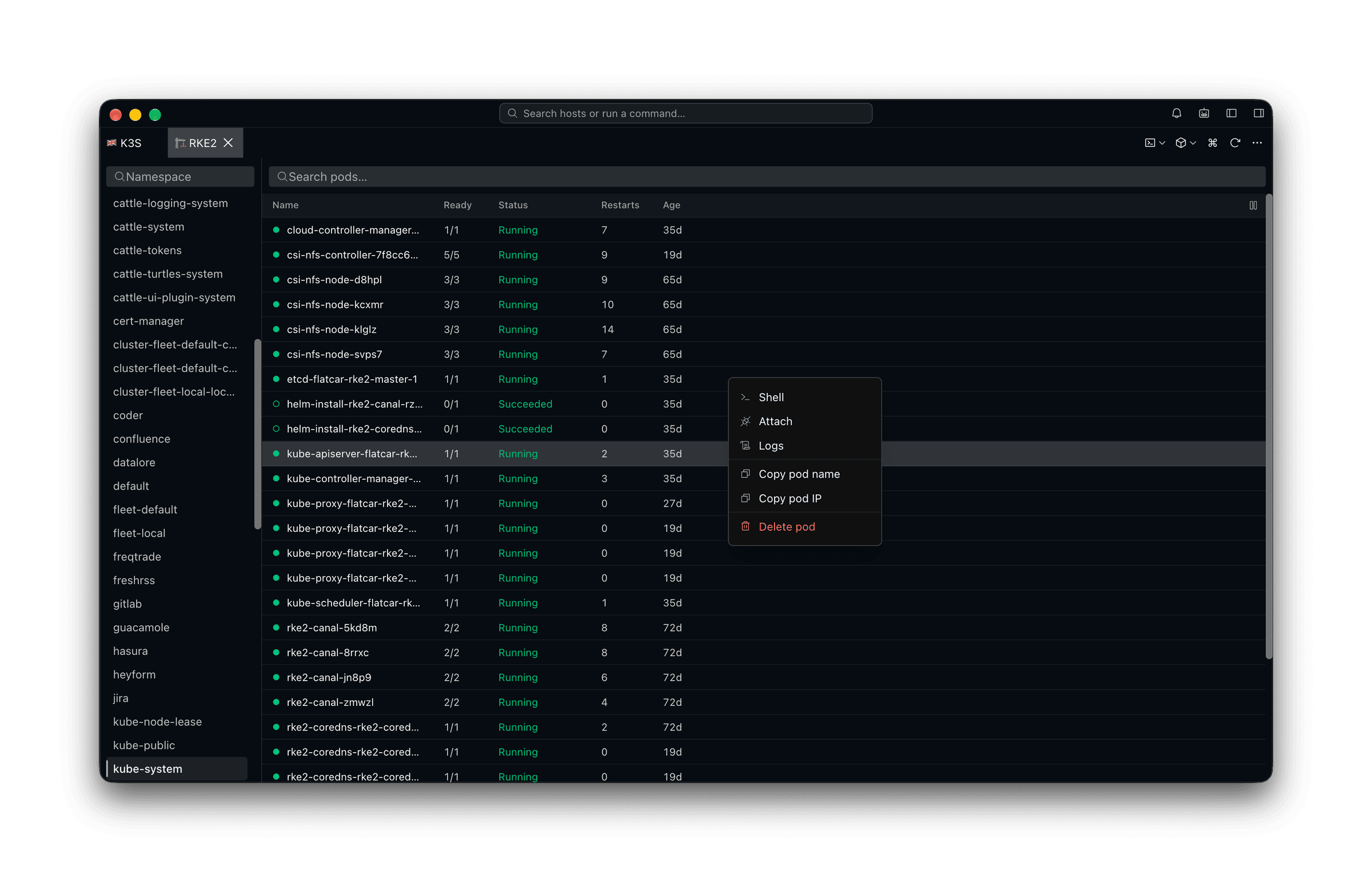
Shell, logs, attach — off the pod list
The cluster browser opens on pods with the namespaces down one side. Right-click the one that is misbehaving and pick what you want from it; switching context is a menu, not a kubectl incantation.
The classic tools
A cluster shell for kubectl and helm
What the browser does not cover, a terminal does. The cluster shell is a real shell with KUBECONFIG already pointed at the profile you picked, so helm, kustomize, k9s and the patch you keep in a note all work against the right cluster.
The layer Lens does not cover
A node shell, and the node itself
When the pod is fine and the machine is not, the cluster view runs out. This is where having an SSH client in the same app stops being a coincidence.
AI in the pane
An agent that reads what the container is printing
Every session here — pod shell, logs pane, cluster shell, node shell — is readable and drivable by the agent, so it works from the output in front of you rather than from a description of it.
Frequently asked questions
- Is this a full replacement for Lens?
- No, and we would rather be clear about it. There is no resource browser for every kind, no YAML editor, no Helm release UI and no metrics dashboards. What there is covers pods, logs, exec, attach, nodes and node shells, with a cluster shell for the kubectl and helm work — plus everything outside the cluster.
- Why would I use it instead then?
- Because most of what a Lens session gets opened for is a pod and a log, and because the machine under the cluster is usually part of the same investigation. Having both in one window is the point.
- Does it work with EKS, GKE and AKS?
- Yes — including kubeconfigs that call an external binary for credentials, which is how all three normally authenticate.
- Is Kubernetes support free?
- It is a Pro feature. The free plan covers SSH, Mosh, SFTP, FTP, S3 and WebDAV.
- Can I use it from my phone?
- Yes — pod lists, logs, shells, attach and node shells are all in the Android and iOS apps, which is genuinely useful when you are on call. The cluster shell is desktop-only: it runs kubectl and helm as local processes.